Work organisation
Too many everyday tools: the true cost of fragmentation
Teams to chat. Outlook to receive. SharePoint to store. Plan to follow. Each tool has its function. But for the agent, the workday often feels like a constant reenactment.
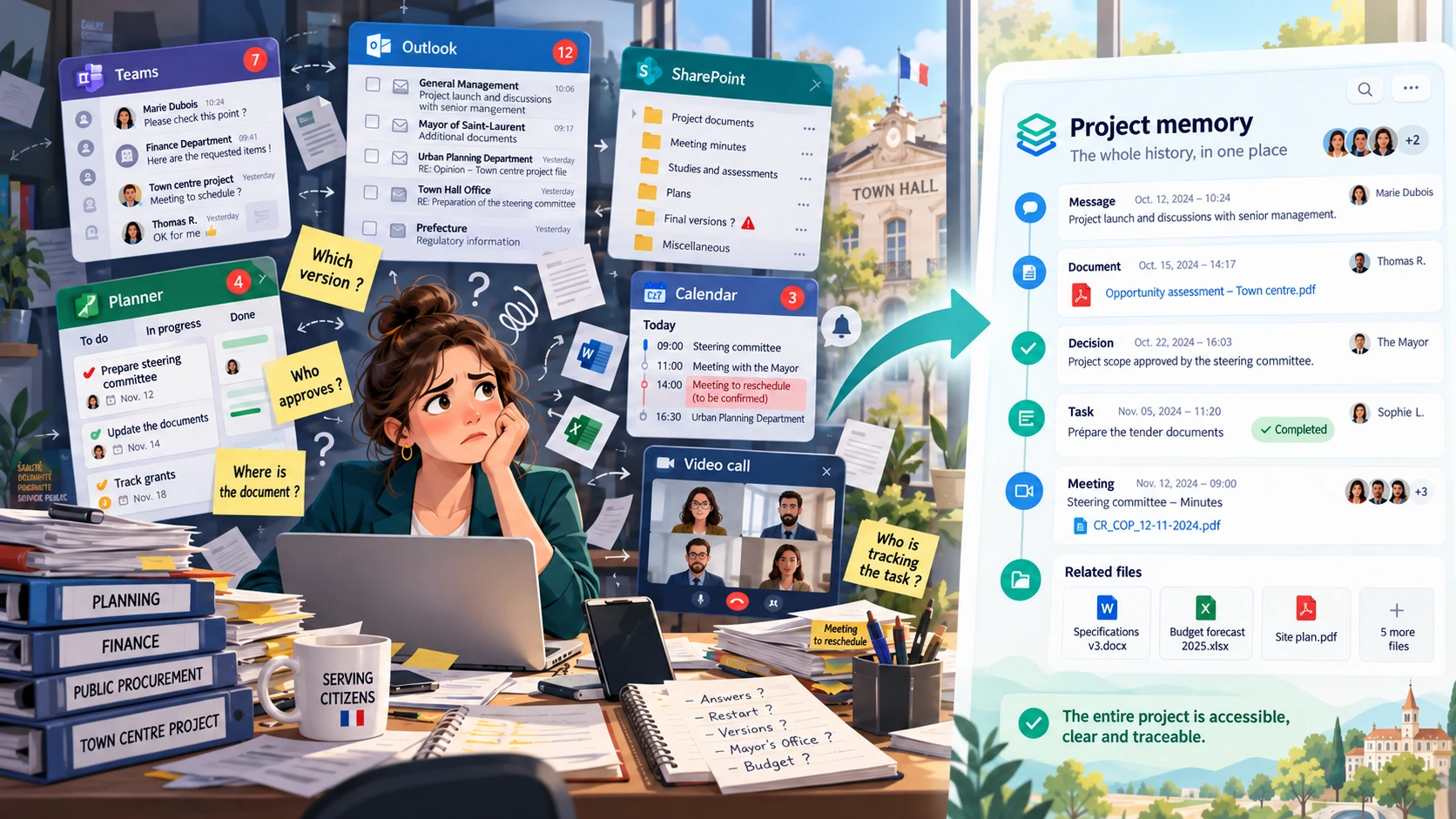
Imagine an agent in front of his screen.
Around him, the tools accumulate.
An exchange in Teams.
An email in Outlook.
A document in SharePoint.
A task in Planner.
An appointment in the calendar.
A report in a file.
A relaunch in a conversation.
A clarification given elsewhere.
Each tool was designed to help.
And yet, seen together, they often produce the opposite effect:
a fragmentation of work.
The subject is not technical.
The subject is not the API.
The subject is also not whether these tools are “good” or “bad”.
The subject is much simpler:
What does the agent really experience on a daily basis when his work is dispersed between several memories?
A day that begins by searching
Before even acting, you often have to find something.
Find the last exchange.
Find the right document.
Find the latest version.
Find the resulting task.
Find who had to validate.
Find if the information has already been transmitted.
The problem is not that there is no information.
On the contrary.
They are everywhere.
But it is distributed between several spaces, several logics, several histories.
In Outlook, we find the message.
In Teams, we find the conversation again.
In SharePoint, we find the document.
In Planner, we find the task.
But to understand the project, you have to mentally connect all of this.
In other words:
the tool keeps the element, but the agent must reconstruct the story.
The real cost is not just wasted time
When we talk about fragmentation, we first think about time.
A few minutes to find a document.
A few minutes to verify a decision.
A few minutes to ask where the subject is at.
A few minutes to switch from one tool to another.
But the real cost is broader.
It also affects:
- the concentration;
- clarity;
- continuity of work;
- the quality of the monitoring;
- and sometimes even responsibility.
Because the more dispersed a project is, the more difficult it becomes to simply answer essential questions:
Who does what?
Where are we?
What decision was made?
Which document is the correct one?
Who was the information sent to?
What was the context?
The collaborator no longer works only on the substance of the file.
He also works at put together the pieces of the file.
Too many tools, it’s not just “too many screens”
Seen from a distance, one might believe that the problem simply comes from the number of applications open.
But the subject is deeper.
What is tiring is not just switching from one screen to another.
It is to move from a memory to another.
Each tool tells a part of the work:
- Outlook tells emails;
- Teams narrates conversations;
- SharePoint tells documents;
- Planner narrates the tasks.
But the project does not live in pieces.
In reality, it all belongs to one story.
A request gives rise to an exchange.
The exchange produces a decision.
The decision results in a task.
The task generates a document.
The document requires validation.
Validation restarts a new exchange.
For the agent, it is a single string.
For tools, these are often several separate histories.
Fragmentation creates “work around work”
This is where a very concrete phenomenon appears.
We are no longer working just to move the issue forward.
We are also working on:
- find the information;
- recontextualize an exchange;
- check a version;
- transmit an element again;
- explain to a colleague what has already happened;
- organize a meeting to bring everyone back to the same level of information.
Part of the day then consists not of producing, deciding or executing…
but reassemble.
This is what we can call “work around work”.
Invisible work, rarely recognized as such, but very present in organizations.
It wears out teams, slows down projects and often gives the paradoxical feeling of being very busy without always progressing as much as we would like.
The meeting sometimes becomes a repair tool
In a fragmented environment, the meeting often plays a special role.
Of course, some meetings are used to decide.
But many are mainly used to put back together what the tools have not kept together.
We meet there to answer questions like:
- “Where are we?”
- “Who has the latest version?”
- “What was validated?”
- “Who should take up the subject?”
- “Which document should I use?”
In other words, the meeting sometimes serves to repair fragmentation.
It allows us to collectively reconstruct what should have remained legible in the history of the project.
This is not abnormal.
But it’s expensive.
Mobilizing several people to reconstitute what already exists somewhere is not the best use of collective time.
In the long run, the agent itself becomes the interface between the tools
This is probably the most revealing point.
When the histories are separated, it is the agent who makes the connection.
He is the one who knows that a particular email in Outlook corresponds to a particular Teams conversation.
It is he who remembers that a particular SharePoint document is linked to a particular Planner task.
He is the one who knows the way.
He is the one who keeps the logic of the project in mind.
As long as it's there, it more or less works.
But as soon as there is an absence, a change of position, a resumption of a file or the arrival of a new collaborator, everything becomes more difficult.
The data still exists.
But their continuity is no longer obvious.
And this is where we see the difference between information retained and a truly structured memory.
The problem is not the connection between the tools
Today, many tools are connected.
You can share a document in an exchange.
Create a task from a discussion.
Access files from multiple environments.
This is useful.
But this is not always enough to constitute a common memory.
Because connecting functions is not the same as bringing together a story.
The real need on the ground is often much simpler:
be able to find, in the same place, the logical thread of the project.
Not just the documents.
Not just exchanges.
Not just tasks.
But their continuity.
What the teams are basically waiting for
Teams are not necessarily waiting for “more tools”.
They often wait:
- less dispersion;
- fewer searches;
- fewer repetitions;
- fewer catch-up meetings;
- less dependence on individual memory;
- and more clarity on the actual progress of the project.
In other words, they expect a digital organization that helps to follow a story, not just to accumulate elements.
FaceCollectivité's response: putting the project back at the center
This is precisely the logic of FaceCollectivité.
Instead of dispersing the same project between several separate memories, FaceCollectivité proposes to structure it in a space designed primarily for the continuity of work.
In the face-to-face thread, the exchanges are organized by subject.
Each exchange can be addressed clearly:
to a manager,
to a subgroup,
or to a broader collective.
Messages, tasks and documents remain linked to the context in which they appear.
The General channel allows you to keep communications that concern the entire project.
The objective is not only to “communicate tools”.
The objective is to ensure that:
the entire project remains readable in the same place.
Getting out of fragmentation does not mean working more
It’s working more simply.
Search less.
Less reconstitute.
Less navigation between parallel histories.
Less dependence on each other's memory.
And more:
- follow;
- understand;
- decide;
- act.
Because ultimately, the real cost of fragmentation is not only IT.
He is human.
It is measured in fatigue, dispersion, loss of continuity and collective time absorbed by the reconstitution.
The challenge is therefore not to multiply the tools.
The challenge is to restore a common memory to work.
Because a project is not a sum of messages, tasks and documents.
It’s a story.
And this story deserves to remain readable.